
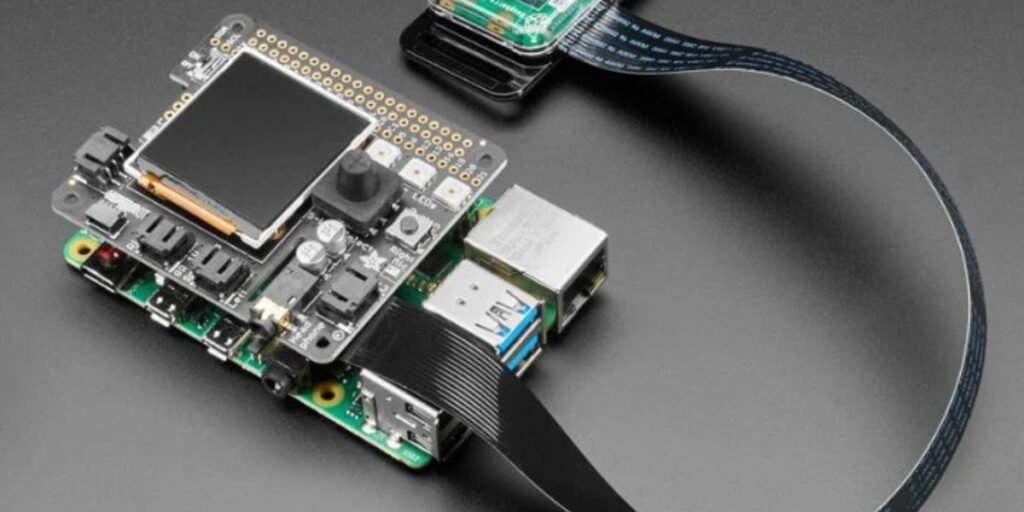
Machine learning is no longer limited to powerful cloud servers and expensive workstations. Today, a credit-card-sized computer can run image recognition models, detect objects through a camera, monitor industrial equipment, automate homes, and power intelligent IoT devices. That computer is the Raspberry Pi.
For students, developers, hobbyists, startups, and businesses across the United States, Raspberry Pi has become one of the most affordable ways to learn and deploy machine learning at the edge. Instead of sending every piece of data to the cloud, machine learning models can run directly on a local device, reducing latency, improving privacy, and lowering bandwidth costs.
This guide explains what Raspberry Pi is, how machine learning works on it, where it is used, what hardware and software you need, and how to build practical machine learning projects.
What Is Raspberry Pi?
Raspberry Pi Ltd develops Raspberry Pi, a small single-board computer originally designed to make computing education more accessible. Over time, it evolved into a versatile platform used in diverse technical environments.
The system is widely implemented across several core fields:
- Artificial intelligence projects
- Robotics and computer vision
- Industrial automation and IoT systems
- Smart homes and environmental monitoring
- Educational research
A Raspberry Pi functions like a regular computer. It has a processor, memory, storage, networking capabilities, USB ports, and supports operating systems based on Linux.
Recent Raspberry Pi models are powerful enough to perform many machine learning tasks locally, making them attractive for edge AI deployments.
Why Use Raspberry Pi for Machine Learning?
Many people ask why they should use a Raspberry Pi when cloud services and high-performance GPUs exist. The answer depends entirely on the specific needs of your deployment.
Low Cost
A complete Raspberry Pi machine learning setup costs significantly less than a dedicated AI workstation. This low barrier to entry makes it highly accessible for rapid prototyping and multi-device deployments.
Edge Computing
Instead of sending data to remote servers, models can make decisions directly on the device. This decentralized approach is critical for specialized applications.
Real-world edge setups frequently include:
- Security cameras identifying intruders
- Manufacturing sensors detecting anomalies
- Smart agriculture systems monitor crops
- Retail systems count customer traffic
Improved Privacy
Sensitive data such as images, video streams, or sensor readings can remain on the local device. This completely eliminates the security risks associated with transmitting private information over the internet.
Real-Time Processing
Applications like object detection and predictive maintenance often require instant responses. Local processing eliminates cloud communication delays, dropping latency from hundreds of milliseconds down to near-instantaneous local speeds.
Lower Operating Costs
Organizations avoid continuous cloud processing expenses by running inference directly on edge devices. This predictable hardware expense replaces volatile, volume-based cloud subscription API fees.
Read More: Machine Learning: How It Works, Types, Algorithms, and Real-World Uses
Can Raspberry Pi Actually Run Machine Learning?
Yes, but understanding its architectural limitations is important.
The Raspberry Pi hardware ecosystem is specifically optimized for:
- Machine learning inference
- Small to medium-sized models
- Computer vision applications
- TinyML projects
- Edge AI deployments
The hardware architecture is not ideal for:
- Training very large neural networks
- Training large language models
- Massive GPU-intensive workloads
Most developers train models on a powerful PC or cloud platform and then deploy the trained model onto Raspberry Pi for inference. This approach delivers the best balance between performance and cost.
Which Raspberry Pi Is Best for Machine Learning?
Raspberry Pi 5
The Raspberry Pi 5 is currently the strongest option for machine learning projects. It delivers massive upgrades over its predecessors, making it highly capable for demanding AI tasks.
Key performance advantages include:
- Faster CPU performance via a 2.4 GHz quad-core ARM Cortex-A76 processor
- Improved graphics capabilities and upgraded silicon architecture
- Better memory bandwidth through LPDDR5X support
- Enhanced AI and computer vision support via a dedicated PCIe 2.0 interface
These capabilities make it ideal for computer vision, real-time object detection, smart camera systems, and robotics.
Raspberry Pi 4
The Raspberry Pi 4 remains widely used for machine learning projects. While it lacks the raw processing throughput of the newest model, its quad-core Cortex-A72 processor is highly reliable for stable deployments. It is perfectly suitable for TensorFlow Lite applications, sensor-based AI systems, and educational projects.
Raspberry Pi Zero 2 W
The Raspberry Pi Zero 2 W is best for lightweight machine learning tasks where power consumption matters more than performance. It utilizes a downclocked quad-core 64-bit ARM processor and is built specifically for ultra-low-power TinyML applications.
Hardware Components You May Need
Camera Module
A high-quality physical camera lens is crucial for feeding visual data into your neural networks. The official Raspberry Pi Camera Module 3 offers high resolution and rapid autofocus capabilities.
This component is useful for:
- Face recognition
- Object detection
- Quality inspection
- Traffic monitoring
AI Accelerators
Hardware accelerators dramatically improve performance by taking the heavy mathematical burden off the main processor.
Popular options include:
- Google Coral USB Accelerator: Integrates an Edge TPU capable of performing 4 trillion operations per second using low power.
- Hailo-8 AI Accelerator: Offers up to 26 tera-operations per second, matching perfectly with the Raspberry Pi 5 M.2 interface to handle complex multi-stream video pipelines.
These devices help run neural networks much faster than the Raspberry Pi CPU alone.
Environmental Sensors
Useful for predictive analytics and monitoring applications. These sensors feed structured alphanumeric data directly into classification or regression models.
Common sensor variations include:
- Temperature sensors
- Humidity sensors
- Motion sensors
- Air quality sensors
Read More: What Is Deep Learning? Concepts, Models, and Real-World Uses
Software Required for Machine Learning
Raspberry Pi OS
The primary operating system used on Raspberry Pi devices. It is a highly optimized Debian-based Linux distribution built to squeeze maximum performance out of the underlying ARM hardware.
Python
Python remains the most common programming language for machine learning development. It acts as the structural bridge connecting underlying C++ machine learning backends to clean, readable user scripts.
TensorFlow Lite
TensorFlow Lite is optimized for edge devices. It allows engineers to take heavy models trained on standard computers and compress them down into a mobile-friendly format.
Benefits include:
- Fast inference speeds on low-power silicon
- Lower memory usage that avoids system crashes
- Efficient deployment pipelines across various Linux environments
OpenCV
OpenCV provides tools for real-time computer vision processing. It handles the raw video capture, image resizing, and color conversions needed before data can pass into a machine learning model.
Key applications include:
- Image processing
- Video analysis
- Face detection
- Object tracking
PyTorch
PyTorch can also run on Raspberry Pi, although TensorFlow Lite is often preferred for deployment. PyTorch Mobile and ExecuTorch allow developers who prefer the PyTorch ecosystem to execute their models on edge hardware.
Setting Up Raspberry Pi for Machine Learning
Step 1: Install Raspberry Pi OS
Download and install Raspberry Pi OS on a high-speed microSD card using the official Raspberry Pi Imager tool. Insert the card into your device, boot it up, connect to the internet, and open the terminal interface.
Run the following commands to ensure all system packages are fully up to date:
Bash
sudo apt update
sudo apt upgrade
Step 2: Install Python Tools
Most modern machine learning libraries are distributed via Python package repositories. Ensure you have the Python 3 package manager installed and configured by running this command:
Bash
sudo apt install python3–pip
Verify your installation is correct by checking the active system version:
Bash
python3 —version
Step 3: Install Machine Learning Libraries
Now you can install the core computational frameworks. Execute these commands sequentially to install the runtime tools, computer vision libraries, and mathematical packages:
For TensorFlow Lite:
Bash
pip install tflite–runtime
For OpenCV:
Bash
pip install opencv–python
For NumPy:
Bash
pip install numpy
Step 4: Test Your Environment
Create a simple Python script using an editor like Nano or Thonny. Add import statements for tflite_runtime, cv2, and numpy, then run the script to ensure all libraries load correctly without throwing initialization errors.
Running Your First Machine Learning Model
The transition from a raw dataset to a working edge deployment requires a structured workflow. Because the Raspberry Pi is built for efficiency rather than heavy computation, training a model directly on the device is rarely practical. Instead, the process relies on a cross-platform deployment pipeline.
The standard operational workflow follows these specific phases:
- Train your neural network or machine learning model on a powerful desktop PC, laptop, or cloud platform using full frameworks like TensorFlow or PyTorch.
- Convert the completed model into an optimized format, such as a TensorFlow Lite (.tflite) file, using quantization techniques to shrink the file size.
- Transfer the converted file over to the storage drive of the Raspberry Pi via secure shell protocols or direct physical media.
- Run inference locally by writing a lightweight Python script that passes hardware data inputs directly into the optimized model file.
Consider a practical example involving visual categorization. The Raspberry Pi captures a frame from an attached camera sensor, converts the image pixels into a normalized mathematical array using OpenCV, and feeds that array into the TensorFlow Lite interpreter.
The local processor calculates the layer weights instantly, outputting a prediction value and a confidence percentage on the screen in real time without ever reaching out to an external network.
Popular Raspberry Pi Machine Learning Projects
Smart Security Camera
A connected camera module continually reviews video frames to identify specific subjects. Rather than traditional motion detection that triggers an alert for a waving tree branch, the on-device model filters the video feed to detect specific targets.
Common tracking targets include:
- People walking within pre-defined boundary zones
- Vehicles entering or exiting a driveway
- Animals wandering near protected properties
- Suspicious activity or unexpected environmental changes
These systems find immediate application in home security setups, commercial warehouse monitoring, and retail surveillance environments where off-grid, automated monitoring is necessary.
Face Recognition System
Unlike basic object classification, face recognition compares specific facial geometric vectors against a local database of known profiles. The Raspberry Pi crops an incoming image of a face, maps key landmarks, and runs a distance calculation against stored templates to verify identity. This project structure is regularly deployed to manage automated student attendance tracking, hands-free access control points, and smart home entry systems.
Predictive Maintenance
Industrial operations use Raspberry Pi setups combined with advanced analytical models to monitor machinery health. By tracking physical indicators, the system identifies structural anomalies that indicate an impending breakdown.
The hardware reads continuous data points from dedicated sensors:
- Vibration sensors track mechanical misalignment
- Thermal probes measuring friction-induced heat spikes
- Acoustic microphones are catching internal component grinding
Machine learning models analyze these incoming signals, predicting mechanical failures well before they occur to minimize factory downtime.
Smart Agriculture
Farmers deploy weather-proofed edge devices across crops to manage agricultural yield optimization. The local device collects metrics from distributed fields to determine soil conditions, immediate irrigation requirements, and early signs of crop plant diseases.
Traffic Monitoring
Municipal engineers deploy edge computing nodes directly onto streetlights to evaluate urban mobility patterns. The system processes video feeds locally to log vehicle counts, track intersection congestion patterns, and monitor public parking occupancy rates without violating citizen privacy laws.
Wildlife Monitoring
Conservation organizations utilize ruggedized, battery-powered camera traps deep in natural habitats. When an animal passes by, the internal AI model immediately classifies the species, allowing researchers to track endangered populations without sorting through thousands of empty, wind-triggered images.
Computer Vision: The Most Popular Raspberry Pi AI Application
Computer vision represents the single largest use case for edge hardware. The structural combination of a dedicated camera interface and optimized matrix math libraries allows a low-cost single-board computer to mimic human sight in real-time environments.
Using OpenCV alongside TensorFlow Lite frameworks, developers can build reliable visual systems:
- Detect people moving through public transit corridors
- Recognize faces to unlock secure internal workstations
- Read automotive license plates at access control gates
- Count manufactured units moving down high-speed conveyor belts
- Identify surface defects in assembly line components
This technical flexibility explains why computer vision applications have rapidly expanded out of hobbyist garages and into commercial retail analytics, global logistics hubs, industrial automated production lines, and smart city infrastructure projects.
Machine Learning in Industrial and Business Environments
Many commercial organizations are rapidly adopting edge AI infrastructure because relying purely on cloud computing architecture introduces significant operational friction.
Manufacturing
Industrial facilities use edge devices directly on the factory floor. Machine learning systems monitor heavy machinery health to prevent catastrophic assembly line failures, while automated optical inspection models check units for physical defects at a lower cost than manual human reviews.
Retail
Brick-and-mortar storefronts install edge devices to gather actionable physical metrics. Common implementations include anonymous customer counting systems to track foot traffic, real-time shelf inventory monitoring, and automated queue checkout optimization to reduce customer wait times.
Healthcare
Medical facilities use localized AI processing to parse continuous telemetry from patient wearable sensors. Processing this data on-site ensures critical medical warnings are flagged with zero network delay, while keeping sensitive personal health records securely confined inside the building.
Energy and Utilities
Utility operators deploy single-board computers inside remote field environments. These hardened-edge devices continually monitor remote electrical power grids, solar panel array outputs, and deep water pumping infrastructure without needing constant high-bandwidth satellite connections.
Challenges You Should Expect
Limited Processing Power
While a Raspberry Pi is remarkably fast for its size, it cannot match the raw throughput of a dedicated server GPU. Complex, deep neural networks with hundreds of layers will experience low frame rates and high latency if they are not explicitly optimized for edge deployment.
Memory Constraints
Large models often exceed the available RAM allocation on smaller hardware variants. If your machine learning model requires multiple gigabytes of memory space just to hold its structural weights, the Raspberry Pi will run out of memory and terminate the process during initialization.
Thermal Management
Running heavy mathematical workloads continuously pushes the processor to its performance limits, generating significant heat. Without proper thermal management, the system will trigger automatic thermal throttling to protect the silicon, severely degrading your model inference speeds.
Advanced setups mitigate these temperature issues using specific components:
- Active cooling fans that dynamically adjust speed based on core temperature
- Heavy aluminum heat sinks draw thermal energy away from the silicon
- Dedicated hardware accelerators to offload processing from the main CPU
Battery Considerations
Portable or off-grid deployments require careful power management. Running intensive computer vision models draws continuous current, making efficient model design and low-power standby modes critical for extending battery runtime.
Best Practices for Better Performance
Use TensorFlow Lite Models
Always convert your standard framework models into the .tflite format before moving them onto your hardware. These files are stripped of training overhead and use optimized math routines written specifically for ARM processor architectures.
Quantize Models
Model quantization converts the internal weights of a neural network from standard 32-bit floating-point numbers down to efficient 8-bit integers. This simple mathematical compression reduces storage space requirements, minimizes memory consumption, and slashes inference processing times with negligible impacts on overall accuracy.
Use Hardware Accelerators
If your application requires high-definition video processing or multi-model pipelines, offload the work to an external accelerator. Integrating a hardware co-processor like a Google Coral USB unit can accelerate your frame processing speeds by orders of magnitude.
Reduce Input Resolution
Do not feed high-resolution images directly into a machine learning model. Scaling an input video frame down to smaller resolutions like 224×224 or 300×300 pixels dramatically decreases the number of calculations the CPU must perform, yielding immediate speed gains.
Optimize Data Pipelines
Keep your software input loops lean. Use multi-threading techniques to ensure that while your camera is pulling a fresh frame from the hardware sensor, your machine learning model is simultaneously processing the previous frame in a parallel thread.
Recent Developments in Raspberry Pi and Edge AI
Several major industry trends are expanding the role of the Raspberry Pi ecosystem inside commercial machine learning environments.
The widespread availability of the Raspberry Pi 5 has shifted expectations for edge computing. Thanks to its native PCIe support and upgraded processor architecture, tasks that previously required dedicated industrial computers can now run on hardware costing under a hundred dollars.
Edge AI has grown into a core priority across global manufacturing, high-volume logistics, physical retail, and municipal smart city projects. Instead of building massive data pipelines back to centralized servers, enterprises are intentionally pushing the analytical intelligence directly to the physical endpoint where the data is born.
The adoption rate of hardware accelerators is rising quickly. Plug-and-play modules make it trivial to scale up the processing capabilities of existing single-board installations, allowing them to handle increasingly sophisticated neural networks without a complete hardware overhaul.
Compliance mandates and economic realities are driving the shift toward on-device AI. Processing data locally provides an airtight method for meeting strict privacy compliance laws, eliminates volatile cloud computing service bills, and enables real-time, split-second decision-making that functions perfectly even during total network outages.
At the same time, the rapid rise of the TinyML movement is creating highly compact, hyper-efficient models. These specialized algorithms are designed to run on minimal hardware footprints, allowing developers to embed smart classification capabilities into ultra-low-power peripheral sensor nodes connected directly to a central Raspberry Pi ecosystem.
These technical shifts have pushed the Raspberry Pi platform far beyond its origins as an educational novelty or a weekend hobbyist tool, solidifying its place as a viable platform for real-world commercial deployments.
Is Raspberry Pi Good for Learning Machine Learning?
For the vast majority of students, developers, and engineers, the answer is undeniably yes.
Working with physical edge hardware provides an immediate, practical understanding of modern systems:
- Writing clean, highly optimized Python code under strict hardware constraints
- Deploying real-time machine learning models outside of idealized cloud environments
- Configuring computer vision pipelines to handle unpredictable, real-world lighting changes
- Mastering the practical mechanics of edge computing and decentralized network architectures
- Integrating hardware IoT devices with physical electronic sensor modules
- Structuring data analytics pipelines to process raw telemetry efficiently
This hands-on experience teaches engineering skills that translate directly into modern AI infrastructure roles. As modern businesses look to deploy localized intelligence closer to end-users, knowing how to balance model accuracy against physical hardware constraints is an invaluable skill.
For technology professionals across the United States, the Raspberry Pi remains a highly practical and accessible framework for exploring how artificial intelligence interacts with the physical world. Rather than limiting your focus to purely training models in a browser window, working with an edge device forces you to master the complete lifecycle of a machine learning model, from initial data collection to real-time physical execution.