Organizations constantly develop operational workarounds as they scale over time. A spreadsheet that began as a temporary tracker becomes a permanent fixture. An extra approval checkpoint is added to mitigate risk, and data gets re-entered into multiple isolated systems because integration was deprioritized during initial growth phases. Individually, these adjustments appear minor, but collectively they create severe operational friction that surfaces during high-growth cycles or periods of market pressure.
Market research indicates that the global workflow automation market valuation sits at $27.8 billion, on pace to scale past $71.7 billion with a compound annual growth rate of 14.5%.
Data shows that 78% of business leaders report enhanced organizational productivity from systematic task orchestration, while 73% of IT executives confirm that process routing cuts manual labor hours in half.
Eliminating repetitive administrative overhead shifts human talent toward strategic problem-solving. This guide analyzes the core architectural mechanics, cross-departmental utility, and implementation strategies behind modern workflow automation.
What Is Workflow Automation?
Workflow automation is the design, execution, and continuous optimization of digital processes where tasks, data, and documents pass between people or systems according to pre-defined business rules.
Unlike manual task execution that relies on human memory and email chains, workflow automation coordinates digital triggers, conditional routing, and automated data updates.
The primary objective is to replace repetitive administrative steps with predictable software routines that enforce compliance and eliminate processing bottlenecks.
Organizations consider workflows a core asset because processing speed and data accuracy dictate day-to-day commercial responsiveness.
Aligning automated logic with actual operating conditions ensures that systems accelerate throughput without removing the necessary oversight required for complex decisions.
How Workflow Automation Works
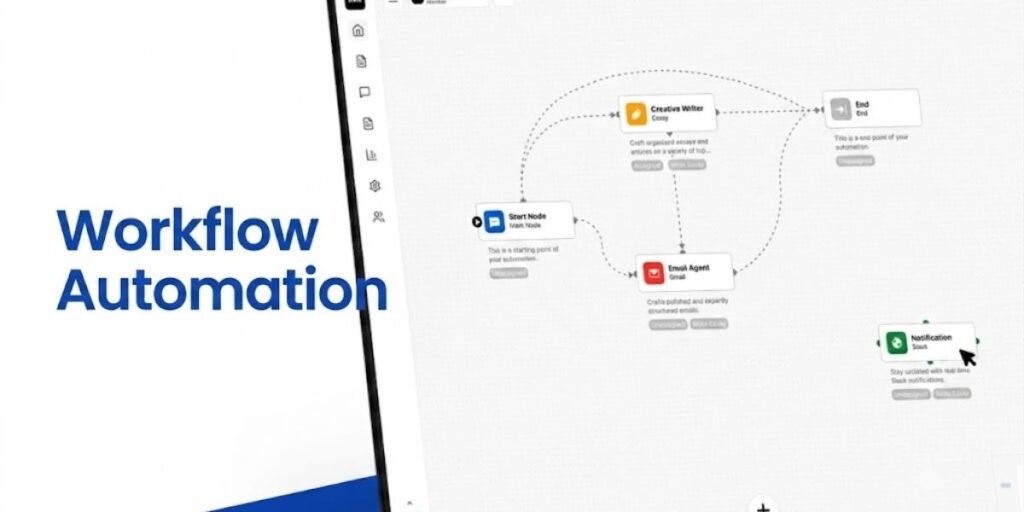
Building an automated operational sequence relies on a structured lifecycle that connects triggers, conditions, and actions across enterprise software systems.
- The Trigger: An event initiates the workflow, such as a customer submitting a web contact form, an invoice landing in a shared inbox, or an employee record updating in an HR database.
- The Condition: The system evaluates specific parameters attached to the trigger, such as whether an invoice amount is below a certain threshold or if a job applicant meets specific credential criteria.
- The Action: Based on the rule evaluation, the platform executes a task, such as routing the document to a manager for sign-off, syncing record fields to a cloud CRM, or dispatching an automated confirmation email.
Why Businesses Invest in Workflow Automation
Deploying process orchestration delivers quantifiable efficiency gains that impact corporate overhead and error rates directly. Organizations leverage automation to eliminate manual double-entry across disparate software platforms, reducing human error rates that compromise downstream analytics.
Industry benchmarks note that 30% of business leaders achieve measurable labor cost reductions through automated process management.
Enforcing standardized approval paths ensures that every transaction leaves an unalterable audit trail for compliance and risk management.
Furthermore, reducing cycle times for client onboarding or supply chain procurement accelerates cash velocity and improves overall service-level agreement adherence.
Which Business Processes Are Best Suited for Automation?
Selecting optimal candidates for process automation requires identifying workflows that balance high volume with predictable decision logic. Experienced practitioners evaluate processes against specific operational criteria before writing configuration rules.
- Repeatable: The task occurs frequently and follows a consistent, predictable sequence of steps.
- Rules-Based: Decision branching relies on clear conditional logic rather than subjective interpretation.
- High Volume: The transaction frequency supports a rapid and measurable return on investment.
- Measurable: Cycle time, error rates, or labor hours per transaction can be clearly tracked.
Processes heavily reliant on subjective human judgment, creative nuance, or unstructured crisis response remain poor candidates for rigid automation.
Real Workflow Automation Examples Across Different Departments
Human Resources
Human resources teams manage heavy document flows during employee lifecycles that benefit immediately from automated routing. New hire onboarding initiates when a signed offer letter syncs from an applicant tracking tool into the core human capital management database.
The system automatically generates a unique corporate email address, provisions digital badge access rights, and assigns mandatory compliance training modules.
Offboarding triggers a parallel automated sequence that revokes software credentials, schedules exit interviews, and initiates final payroll reconciliations without manual tracking sheets.
Finance
Finance departments rely on speed and accuracy to maintain cash flow velocity and vendor relationships. Invoice processing begins when a vendor PDF arrives in an accounts payable inbox, where optical character recognition software extracts line items and amounts.
The platform matches the extracted data against the original purchase order and internal receiving records.
If all data points align, the transaction routes for automated payment scheduling, while discrepancies trigger exception notifications to purchasing managers.
Sales
Sales operations require rapid handoffs between lead generation, pipeline tracking, and customer conversion. Lead routing systems evaluate incoming website demo requests based on geographic location and company size parameters.
The software immediately assigns the account to the appropriate territory representative and schedules a calendar invitation.
Updating a deal stage to closed-won automatically generates an invoice draft, triggers an email introduction to the implementation team, and syncs account details to the billing ledger.
Marketing
Marketing workflows coordinate multi-channel campaigns, lead scoring models, and content distribution schedules. Lead nurture programs track visitor engagement across website resources, automatically upgrading contact scores when prospects download technical whitepapers.
Once a score threshold is reached, the system updates the contact record in the customer relationship management platform for direct sales outreach.
Automated social media schedulers and email dispatch tools streamline asset delivery without manual campaign intervention.
Read More: What Is Email Marketing Automation? How Automated Email Workflows Increase E-Commerce Sales
Customer Support
Customer support operations manage high volumes of inbound inquiries that require fast triage and resolution tracking. Support ticket systems parse inbound emails, using natural language processing to categorize requests by issue type and sentiment.
High-priority tickets from enterprise accounts route instantly to senior engineers, while routine password resets trigger automated knowledge base recommendations.
Ticket closure automatically sends a satisfaction survey and updates account health metrics in the central analytics dashboard.
IT
Information technology teams handle complex asset provisioning, access control requests, and infrastructure monitoring alerts. Software access requests submitted through an internal portal trigger automated manager approval routing.
Upon sign-off, identity management tools provision the requested software license and log the allocation in the hardware asset register.
Infrastructure alerting systems automatically spin up diagnostic logs and open incident tickets when server memory thresholds cross pre-defined operational limits.
Procurement
Procurement workflows govern vendor onboarding, purchase requisitions, and supply chain compliance validations. Purchase requests submitted by department heads automatically verify budget availability against divisional accounting limits.
Approved requests generate formal purchase orders that route to selected vendors through electronic data interchange networks.
Vendor compliance management tools track insurance certificates and tax documentation, flagging expiration dates before contract renewals.
Healthcare
Healthcare administrative workflows coordinate patient intake, appointment scheduling, and insurance pre-authorizations. Patient registration portals automatically verify insurance eligibility against payer databases prior to clinical visits.
Appointment scheduling systems dispatch automated text reminders to reduce no-show rates across busy outpatient clinics.
Discharge documentation routes seamlessly to primary care providers while updating internal bed management boards in real time.
Workflow Automation vs Business Process Automation
While professionals use these terms interchangeably, distinct operational scopes separate workflow automation from broad business process automation (BPA).
- Workflow automation focuses on the tactical routing of tasks, data, and documents within a specific, linear operational sequence.
- Business process automation operates at a much wider scale, encompassing multiple interconnected workflows, disparate departmental systems, and overarching enterprise goals.
For example, automating the email notification sent when a customer service ticket closes is workflow automation. Redesigning the entire customer service division, integrating inventory logistics, and optimizing support routing metrics constitutes business process automation.
Understanding this distinction helps leadership teams invest in the right architectural depth for their operational needs.
Workflow Automation vs RPA vs AI Automation
Navigating modern software categories requires differentiating between rule-based routing, software bots, and cognitive intelligence.
- Workflow automation orchestrates structured data movement across application programming interfaces and human touchpoints within defined logic paths.
- Robotic Process Automation (RPA) deploys software robots to mimic human screen interactions, clicking buttons and scraping legacy desktop interfaces that lack modern API integrations.
- AI automation incorporates machine learning models and large language models to interpret unstructured data, such as reading handwritten notes or generating conversational customer responses.
Combining these tools allows an enterprise to parse unstructured documents with AI, route data through a workflow engine, and update legacy databases using RPA bots.
The Building Blocks of an Effective Automated Workflow
Designing a stable automated process requires assembling core architectural components that ensure reliable execution.
- Inputs: Clean, validated data fields originating from forms, files, or API payloads.
- Logic/Rules: Explicit conditional statements that govern how data moves and branches.
- Integrations: Secure, functioning connections between disparate software repositories.
- Outputs: Successful data updates, generated documents, or human notifications.
- Exception Handlers: Pre-defined fallback paths for data errors or unapproved conditions.
Skipping exception handling leads to system freezes or lost transactions when unexpected data values enter the pipeline.
How to Design a Workflow Before You Automate It
Automating a broken or poorly structured process only speeds up dysfunction rather than fixing inefficiency. Practitioners must map the current state of a workflow manually before selecting digital triggers or writing routing scripts.
- Audit the Existing Path: Document every actual step, participant, and data handover in the manual procedure.
- Identify Bottlenecks: Locate where approvals stall, documents duplicate, or data re-entry occurs.
- Streamline and Simplify: Remove redundant review checkpoints and redundant data fields before writing software logic.
- Define the Future State: Map the streamlined sequence explicitly to guide software configuration and user testing.
Skipping manual process mapping typically leads to automated logic that locks up when encountering real-world variations.
Choosing the Right Workflow Automation Platform
Selecting an enterprise workflow engine requires evaluating capabilities against current infrastructure and technical skill levels. Low-code and no-code platforms allow non-technical business units to build functional automations using drag-and-drop interfaces without heavy IT backlogs. Developer-centric orchestration tools provide deep API extensibility, complex conditional branching, and version-controlled script writing for technical engineering groups.
Evaluators must also check for robust audit logging, role-based access security, native software connector libraries, and elastic cloud scaling limits.
Matching platform complexity to actual organizational technical capacity ensures long-term user adoption rather than abandoned software licenses.
Common Challenges During Workflow Automation Projects
Deploying enterprise process automation frequently runs into institutional and technical roadblocks. Legacy system integration friction occurs when older on-premise databases reject modern cloud API calls, requiring custom middleware layers. Change resistance surfaces when operational staff view automation as a threat to job security rather than a relief from administrative burdens.
Failing to secure cross-departmental alignment leads to siloed workflows that clash during corporate data handoffs.
Allocating dedicated change-management resources and running controlled pilot phases helps organizations smooth these operational transitions.
Measuring Whether Workflow Automation Is Actually Working
Quantifying automation success requires tracking performance indicators that reflect true process velocity and accuracy. Organizations monitor average cycle time reduction to see how fast transactions clear from trigger to completion.
They measure error rate drops by comparing pre-automation data correction logs with automated input metrics.
Tracking overall labor hours saved per transaction and evaluating user adoption rates across business units confirm whether the deployment delivers its projected return on investment.
Workflow Automation Trends Shaping Modern Businesses
The landscape of task orchestration continues to evolve alongside advances in intelligent software architectures. Agentic AI integration allows automated routines to make autonomous decisions based on contextual document parsing rather than rigid binary rules. Hyperautomation initiatives combine workflow engines, RPA bots, and AI capabilities into a single cohesive operating layer.
Organizations are shifting from basic single-task automation toward end-to-end process orchestration, where disparate cloud ecosystems function as a unified operational fabric.
Frequently Asked Questions
What is workflow automation?
Workflow automation is the digital execution and routing of tasks, data, and documents between participants or systems based on pre-defined business rules.
What is the difference between workflow automation and BPA?
Workflow automation handles linear, tactical task routing within a single process, whereas business process automation spans multiple interconnected workflows and enterprise systems.
Is workflow automation the same as RPA?
No, workflow automation routes structured data across APIs and digital triggers, while RPA deploys software robots to mimic human screen interactions on legacy interfaces.
Which processes should not be automated?
Workflows requiring deep emotional intelligence, creative problem-solving, subjective artistic judgment, or complex crisis negotiation must remain human-driven.
Can small businesses benefit from workflow automation?
Yes, affordable cloud-based and no-code tools allow small teams to eliminate double-entry and accelerate customer response times without enterprise IT budgets.
What industries use workflow automation the most?
Regulated and data-heavy sectors like banking, healthcare, retail logistics, and telecommunications deploy workflow automation at the highest rates.
How does AI improve workflow automation?
Artificial intelligence enables systems to read unstructured documents, classify inbound support sentiment, and dynamically handle conditional logic without manual coding.
How long does workflow automation implementation take?
Simple departmental no-code workflows deploy in days, whereas complex, cross-system enterprise orchestration initiatives can span several months of testing and tuning.